

QuickBooks Desktop Discontinuation: What Farmers Need to Know

For years, thousands of farmers have relied on QuickBooks Desktop to run their books. It was familiar, reliable, and didn’t force your farm office into the cloud before you were ready.
Now Intuit is discontinuing most versions of QuickBooks Desktop, and many farmers feel pushed into a corner. If you’re unsure what this means, what the deadlines are, or whether you need to upgrade to QuickBooks Enterprise, this blog breaks it down clearly and simply.
We compare QuickBooks Enterprise with Traction Ag, a cloud-based farm accounting platform built specifically for farmers. If you are searching for a strong QuickBooks Desktop alternative, you are in the right place.
Why Is QuickBooks Desktop Being Discontinued?
Intuit is shifting toward subscription-based cloud products. As part of that shift, they stopped selling most desktop editions and will discontinue support based on a fixed schedule.
Key Dates Farmers Should Know About QuickBooks Discontinuation
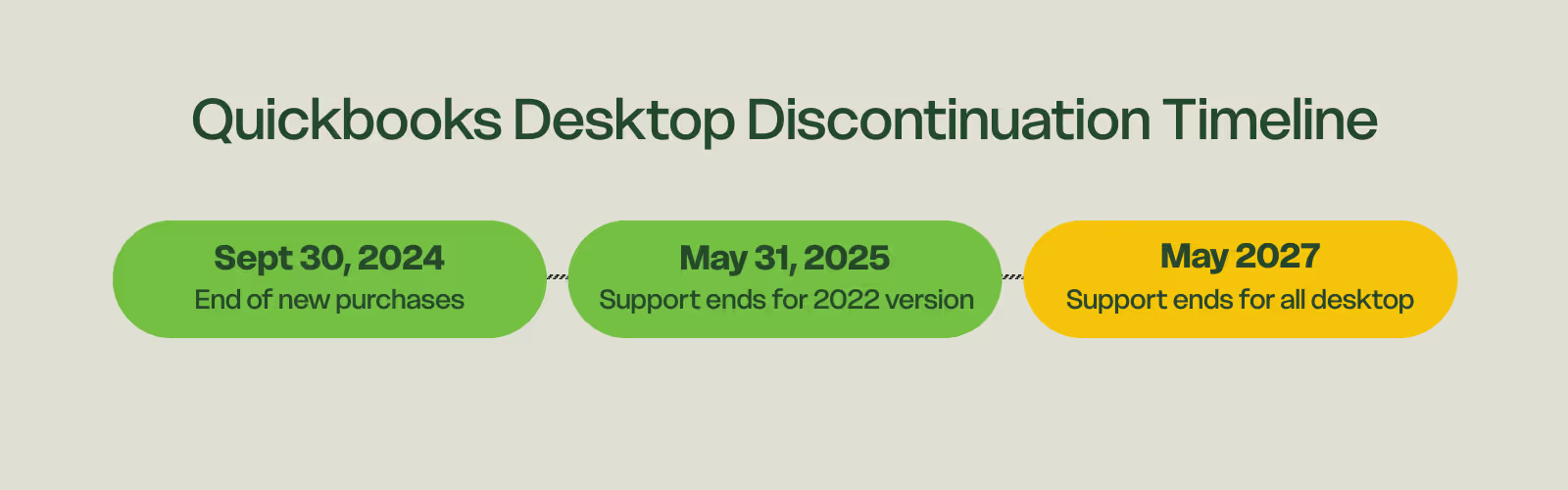
No New Purchases
- September 30, 2024: Last day QuickBooks Desktop Pro, Premier, and Mac could be purchased by new customers
Support Ending
Intuit follows a three-year support window:
- May 31, 2025: Support ends for QuickBooks Desktop 2022 versions
- May 2027: Support ends for QuickBooks Desktop 2024, which was the final version sold
What Happens When Support Ends?
After support ends, several services stop working:
- Bank feeds
- Payroll updates and tax tables
- Credit card processing
- Security patches
- Customer support
- Online services like backup and email features
You can technically keep using the software, but functions will break over time, and security becomes a real concern.
Does QuickBooks Still Offer Any Desktop Version?
Yes. QuickBooks Enterprise Desktop is the only desktop product Intuit continues to sell and support. Pro, Premier, and Mac are discontinued for new users.
What Is QuickBooks Enterprise Desktop?
QuickBooks Enterprise is the high-end desktop accounting product designed for mid-sized businesses. It includes:
- Advanced inventory
- Job costing
- Complex reporting
- Role-based permissions
- Larger file capacity
- Multi-user access
- Payroll included in some tiers
It is powerful software, but there are drawbacks for farms.
Is QuickBooks Enterprise Good for Farmers?
Here is a quick breakdown.
What QuickBooks Enterprise Does Well
- General accounting
- Advanced reporting
- Larger company files
- Familiar QuickBooks layout
What QuickBooks Enterprise Does Not Do Well for Farmers
- No crop or field profitability
- No integration with equipment data
- No seed, chemical, fertilizer, or grain inventory
- No landlord share tracking
- No farm-specific reporting
- Go here to view more differences
This often forces farmers to use QuickBooks for accounting, spreadsheets for field data, and separate farm management tools. That leads to extra work, double entry, and more room for errors.
Is Moving to the Cloud a Good Idea for Farmers?
Short answer: yes.
Benefits of Cloud Accounting for Farms
- Access data from anywhere
- Automatic backups and security updates
- No software installs or yearly upgrades
- Bank feeds reduce manual entry
- Easy integrations to partners for machine data and bills
- Long-term stability without version expirations
Cloud systems align with modern farm operations where you might need financial information from the field, the truck, home, or the office.
A Strong QuickBooks Desktop Alternative for Farmers: Traction Ag
Traction Ag is a cloud-based farm accounting platform designed specifically for agriculture. It replaces multiple tools and gives farmers the financial clarity they need without extra spreadsheets or disconnected systems.
What Traction Does That QuickBooks Does Not
- Field-level profitability such as cost per acre or per bushel
- Automatic connection between field operations and accounting
- Inventory tracking for seed, fertilizer, chemicals, and harvested grain
- Integrated Schedule F reporting
- Sync with John Deere Operations Center and Climate FieldView
- Multi-entity management without extra fees
- Invoicing tools for custom farming, crop share, and joint operations
- Prepaid expense management for seed, chemicals, fertilizer, and fuel
- Farm-focused support from people who understand agriculture
Traction gives farmers tools built for farming instead of general-purpose accounting that requires workarounds.
Real Farmer Experience: Switching to Traction
Chad Everetts explains how switching was easier than he expected and how Traction fits his farm workflow better than QuickBooks.
What Should Farmers Do Next?
Here is a simple guide.
If you want to stay on desktop
Your only option is QuickBooks Enterprise. Otherwise, you might consider PcMars if desktop accounting is required for your operation.
If you want cloud accounting but a general-purpose tool
QuickBooks Online is an option, but it is not designed for agriculture.
If you want the best long-term system for a farm
Traction Ag offers stronger features, less manual work, and better farm insights.
Traction replaces QuickBooks, spreadsheets, and manual cost tracking with one connected platform.

Farm accounting that just works.
Tired of hacking workarounds in software that wasn’t built for farms? We made Traction Ag just for you.

Agape Farms in Ohio